

Introduction
When you’re building a project and just need a simple, fast database, SQLite is usually the first thing that comes to mind. No setup, no server, no headaches.
That’s exactly where I was.
I didn’t want:
- a heavy database like MongoDB or PostgreSQL
- or the complexity of managing connections and async queries
I just wanted something that:
- works locally
- is fast
- and integrates easily with Node.js
That’s when I found better-sqlite3.
At first, it felt perfect — clean API, blazing fast, and super easy to use.
But then I hit a problem…
👉 It worked flawlessly with npm
👉 And completely broke with pnpm
If you’ve ever seen this error:
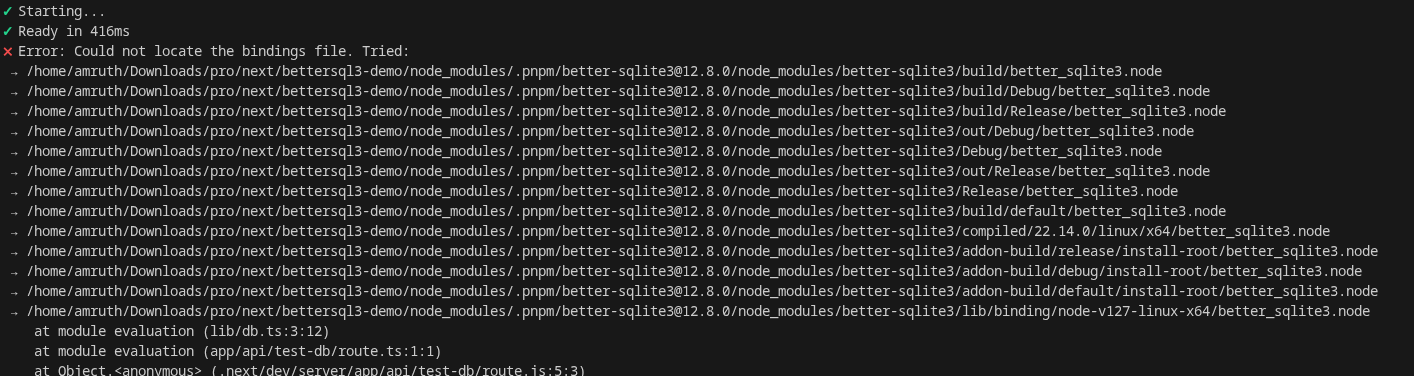
Could not locate the bindings file
…you know how frustrating it is.
In this article, I’ll walk through:
- what
better-sqlite3actually is - why it’s so good
- real-world use cases
- and the pnpm issue (with actual fixes)
Installation
Installing better-sqlite3 is straightforward — but this is also where things can go wrong (especially with pnpm, which we’ll cover later).
Using npm (recommended)
npm install better-sqlite3Using pnpm
pnpm add better-sqlite3Note: You might run into issues with pnpm due to native bindings (we’ll fix this later in the article).
Optional: TypeScript types
npm install -D @types/better-sqlite3What is better-sqlite3?
better-sqlite3 is a SQLite library for Node.js that focuses on performance and simplicity.
It is:
- synchronous (no async/await needed)
- powered by native bindings
- designed for speed and low overhead
Compared to other SQLite libraries, it feels much more direct and developer-friendly.
Basic Usage
Here’s a simple example to get started:
import Database from "better-sqlite3";

// Create or open a database file
const db = new Database("test.db");

// Create a table
db.prepare(`
  CREATE TABLE IF NOT EXISTS users (
    id INTEGER PRIMARY KEY,
    name TEXT
  )
`).run();

// Insert data
db.prepare("INSERT INTO users (name) VALUES (?)").run("Amruth");

// Query data
const users = db.prepare("SELECT * FROM users").all();

console.log(users);
Why this feels so clean
Notice what’s missing:
- no async/await
- no callbacks
- no connection pooling
Everything runs in a simple, predictable flow, which makes it great for:
- scripts
- tools
- small apps
Quick Note
Since it’s synchronous:
- avoid using it in heavy concurrent APIs
- but for most local or low-traffic use cases → it’s perfect
Why better-sqlite3 is So Popular
After using better-sqlite3 for a while, it becomes pretty clear why many developers prefer it over other SQLite libraries.
It’s not just about SQLite — it’s about developer experience and performance.
Let’s break it down:
1. Blazing Fast Performance
One of the biggest reasons to use better-sqlite3 is speed.
- Uses native bindings (C/C++)
- Avoids async overhead
- Executes queries synchronously
Result: Faster than most Node.js SQLite libraries, especially for:
- reads
- small writes
- local operations
2. Extremely Simple API
No callbacks. No promises. No confusion.
Compare:
Typical async style
db.get("SELECT * FROM users", (err, row) => {
  if (err) throw err;
  console.log(row);
});
better-sqlite3
const row = db.prepare("SELECT * FROM users").get();
console.log(row);
Cleaner code = fewer bugs
3. Reliable & Predictable
Because everything runs synchronously:
- No race conditions
- No unhandled promise issues
- Easier debugging
What you write is exactly what runs — in order.
4. Zero Configuration
No:
- database server
- connection setup
- environment variables
Just:
const db = new Database("app.db");That’s it. Your database is ready.
5. Perfect for Local-First Development
This is where better-sqlite3 really shines.
You can:
- spin up a DB instantly
- ship apps without external dependencies
- keep everything self-contained
Real-World Use Cases
This section is very important — it shows when to actually use it:
1. CLI Tools & Dev Utilities
Perfect for:
- storing logs
- caching results
- saving user preferences
Example: A CLI tool that stores history locally.
2. Desktop Apps (Electron)
SQLite is commonly used in desktop apps, and better-sqlite3 fits perfectly:
- fast local storage
- no server required
- works offline
3. Small Web Apps / Side Projects
For projects where you don’t need a full database server:
- admin dashboards
- internal tools
- personal projects
Especially useful in early-stage development
4. Next.js (Low to Medium Traffic Apps)
You can use it for:
- storing small datasets
- prototyping features
- replacing MongoDB in simple apps
Example ideas:
- invoice generator
- local analytics
- temporary data storage
5. Local Caching Layer
Instead of hitting an API repeatedly:
- store responses in SQLite
- read instantly
Great for performance optimization
6. Prototyping & MVPs
If you’re building something quickly:
- no DB setup
- no infra
- just code and run
But It’s Not for Everything
Avoid using it for:
- high-concurrency APIs
- large-scale production apps
- distributed systems
Quick Summary
Use better-sqlite3 if you want:
- speed
- simplicity
- local database
The Issue I Faced
Everything worked perfectly… until I switched to pnpm.
With npm, my setup was smooth:
- install
- import
- run
No issues at all.
But with pnpm, I started getting this error:
Error: Could not locate the bindings file. Tried:
 → .../node_modules/better-sqlite3/build/Release/better_sqlite3.node
And the app just crashed.
“Here’s the exact error I got:”
What’s Actually Happening?
This isn’t a random bug — it comes down to how better-sqlite3 works internally.
Native Bindings
better-sqlite3 uses native C/C++ bindings.
That means:
- it compiles a .node binary file
- Node.js loads that file at runtime
This is why it’s so fast.
How pnpm Changes Things
Unlike npm, pnpm uses a different approach to managing dependencies:
- uses a content-addressable store
- creates symlinks instead of flat node_modules
- enforces stricter dependency resolution
This is great for performance and disk space… but:
Some native modules don’t play nicely with this structure.
Why the Error Happens
In simple terms:
- better-sqlite3 expects the compiled binary in a specific path
- pnpm’s symlinked structure changes that path
- Node fails to locate the .node binding file
Result:
Could not locate the bindings file
Why It Works with npm
npm uses a flat node_modules structure, so:
- native bindings are placed exactly where expected
- no path resolution issues
- everything just works
When This Issue Appears
You’re more likely to see this if you:
- use pnpm
- are working with Next.js
- or install dependencies in a fresh environment
Why This Is Frustrating
Because everything looks correct:
- package is installed
- import works
- no TypeScript errors
…but runtime fails
This makes it confusing, especially if you’re new to native modules.
Key Takeaway
The issue is not with your code.
It’s a combination of:
- how better-sqlite3 handles native bindings
- and how pnpm structures dependencies
How to Fix better-sqlite3 with pnpm
Now that we understand the problem, let’s fix it.
There’s no single “perfect” solution — but these are the ones that actually work in real projects.
1. Rebuild the Native Module
The first thing you should try:
pnpm rebuild better-sqlite3Why this works:
- Recompiles the native .node bindings
- Ensures they match your system and environment
This fixes the issue in many cases.
2. Use node-linker=hoisted
If rebuild doesn’t work, this is the most reliable fix.
Create or update your .npmrc file:
node-linker=hoistedThen reinstall:
pnpm installWhat this does:
- Makes pnpm behave more like npm
- Creates a flatter node_modules structure
- Helps native modules resolve paths correctly
This usually fixes binding issues completely.
3. Manually Reinstall
Sometimes a clean install helps:
rm -rf node_modules pnpm-lock.yaml
pnpm install
Then:
pnpm rebuild better-sqlite34. Fallback to npm (If Needed)
If you don’t want to deal with these issues:
npm install better-sqlite3It works out of the box with npm in most cases.
5. Consider Alternatives
If pnpm is critical for your workflow, you might consider:
- sqlite3 → async but stable
- libsql (Turso) → modern + remote support
Important Note
Even after fixing:
- native modules can still behave differently across systems
- CI/CD environments might need extra setup
Always test in:
- local
- production
- build pipelines
My Recommendation
If you:
- love pnpm → use
node-linker=hoisted - want zero issues → use
npm - want modern infra → explore
libsql
Conclusion
better-sqlite3 is an excellent choice if you want a fast, simple, and zero-config database for Node.js.
It really shines in:
- local apps
- small projects
- prototyping
However, if you’re using pnpm, you might run into issues due to how native bindings are handled.
The good news is — with a few tweaks like:
- rebuilding the module
- or using
node-linker=hoisted
you can get everything working smoothly.
At the end of the day, the choice depends on your setup:
- want simplicity → go with
better-sqlite3 - want zero friction with pnpm → consider alternatives
⭐ If this helped you, share it!
💬 Let me know if you faced this issue!